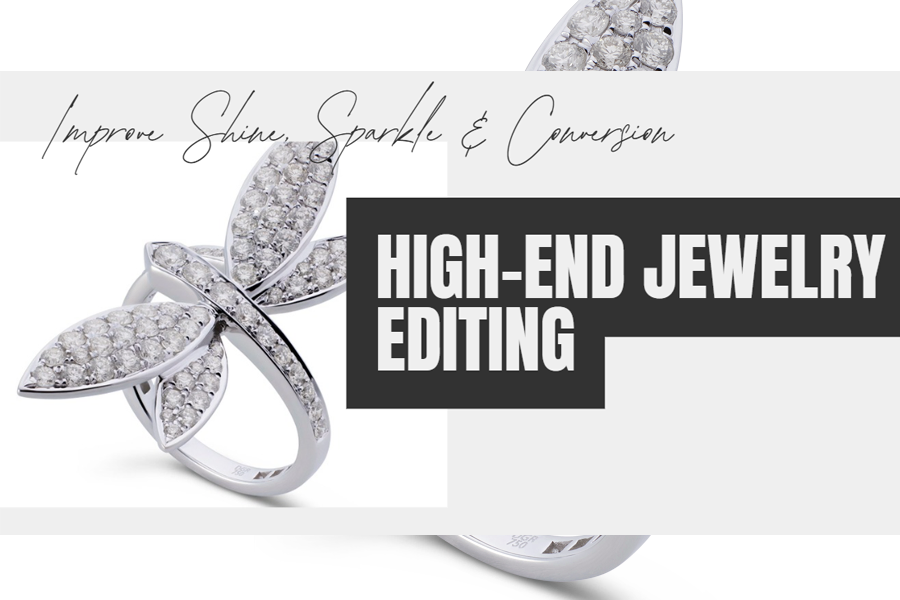
Jewelry photography is one of the most complex areas in product imaging. Unlike clothing or shoes, jewelry has reflective surfaces, tiny gemstones, and intricate textures that are hard to capture with a camera. That’s why jewelry photo editing is crucial for e-commerce stores.
It involves scientifically correcting colors, adjusting lighting, removing reflections, and polishing details so jewelry appears accurate and attractive.
In e-commerce, customers can’t touch or try jewelry. They only rely on images. Without proper editing, gold may appear too yellow, diamonds may lose sparkle & gemstones may look dull. Poor photos reduce trust & often increase returns.
Learning how to edit jewelry photos for e-commerce allows every product to look true to life. By using jewelry retouching, including background removal and jewelry color correction, sellers can present professional, consistent & attractive images. This builds trust, highlights quality & increases sales.
Why Jewelry Photo Editing is Important for E-commerce?
Jewelry is one of the most challenging products to sell online, as buyers can’t feel its weight, shine, or texture. In e-commerce, an image becomes the product itself. This is why jewelry photo editing plays such a vital role. Editing bridges the gap between how jewelry looks
in real life & how it appears on a digital screen. Cameras often fail to capture true brilliance.
Diamonds may lose their sparkle; gold may reflect unwanted colors & gemstones may appear faded. Through retouching & doing color correction, editors restore accuracy. They enhance brightness, balance shadows & remove reflections. This ensures every piece looks natural, detailed & trustworthy.
Consistency is another key factor. E-commerce stores often display hundreds of products. Without editing, photos frequently vary in lighting, background, or color tones, which can make the store look unprofessional. Removing the background from jewelry photos can achieve a clean, uniform look that highlights the design itself.
Top e-commerce platforms, such as Amazon, require white backgrounds & consistent sizing. Without background removal for jewelry, seller cannot even list their products. On Etsy, sellers who invest in high-quality editing often stand out from competitors. Luxury brands like Tiffany & Co. utilize advanced high-end jewelry photo editing to showcase their rich elegance & exclusivity.
Well-edited jewelry images increase trust, reduce product returns & improve conversion rates. Customers feel confident that what they see online will match what they receive.
Common Problems in Jewelry Photography:
Jewelry photography is one of the most technically challenging product shoots. Unlike clothing or furniture, jewelry is small, highly
reflective & detailed. These factors often create problems that can’t be solved with a camera alone.
Reflections: Shiny surfaces, like gold & silver, reflect everything around them, much like photographers, light, instruments & room objects. Without proper jewelry retouching, these reflections distract from the design.
Focus & sharpness: Rings, chains, or earrings are tiny & standard camera settings often blur edges or details.
Lighting is also critical: Hard light can cause glare, while soft light may flatten the sparkle of gemstones.
This is where jewelry photography retouching helps restore natural brilliance.
Color problem: Gold may look too orange, silver too gray & gemstones may lose their vibrancy.
This makes jewelry color correction essential for e-commerce listings.
Dust, fingerprints & scratches: Even luxury brands like Cartier or online sellers on Amazon rely on jewelry image editing services
to clean these difficult flaws. Without this editing, jewelry can appear dull, fake, or of low quality. In turn, this leads to fewer sales
& customer dissatisfaction.
Types of Jewelry & Their Editing Needs
Every type of jewelry has unique features & each requires a different editing approach.
Understanding these needs is important for accurate & professional jewelry photo editing.
Diamond Jewelry
Diamonds are prized for their brilliance. However, cameras often fail to capture their sparkle. Editing diamond jewelry
photos focuses on improving reflections within the facets, sharpening details & balancing light without making them look artificial.
For example, ecommerce brands like Blue Nile highlight diamonds with subtle shine enhancements that look natural yet eye-catching.
Gold Jewelry
Gold is highly reflective & often picks up unwanted colors from surroundings. Without gold jewelry image retouching,
photos may appear with shadows, fingerprints, or camera reflections.
Editors use jewelry color correction to ensure the gold tone looks natural & consistent across all products.
On marketplaces like Amazon, sellers with poor gold color accuracy often face customer complaints.
Silver Jewelry
Silver can look dull or flat in photographs. Editors increase brightness & contrast while avoiding overexposure.
A clean white background with subtle shadows ensures silver items look polished & professional.
Gemstone Jewelry
Gemstones like emeralds, sapphires & rubies are vibrant but often appear faded under studio lighting. With jewelry retouching,
editors restore natural colors, enhance depth & keep transparency intact.
For example, on Etsy, sellers who correct gemstone colors attract more buyers than those who upload unedited images.
Pearl Jewelry
Pearls need a soft touch. Over-editing removes their natural smoothness. Editors focus on gentle highlights & shadows
to keep pearls elegant & rich.
Luxury Jewelry Sets
Consistency is most crucial when editing luxury jewelry full sets, like necklaces, rings & earrings. All items must match in tone,
background & lighting. Professional jewelry image editing services allow the set to look harmonious, which is vital for luxury catalogs
like Cartier or Tiffany & Co.
In short, each jewelry type demands a tailored editing method. From high-end jewelry photo editing for diamonds to subtle corrections
for pearls, understanding these differences helps ecommerce stores display jewelry in its best possible form.
Step-by-Step Guide: Editing Jewelry Photos for E-commerce
in Photoshop
Editing jewelry images for online stores requires patience, precision & a scientific approach. Unlike regular product photos, jewelry
has reflections, tiny details & delicate colors. Without proper jewelry photo editing, even an expensive product can look cheap.
Below is a comprehensive guide on editing jewelry photos in Photoshop for e-commerce.
Step 1: Import & Prepare Your Files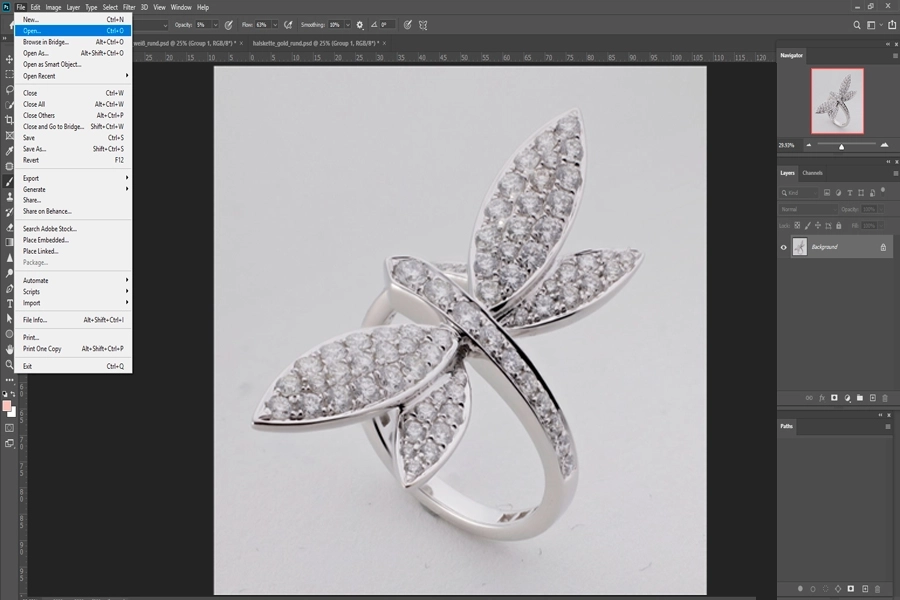
Always start with RAW images. Raw files store more details than JPEGs.
This gives flexibility in editing brightness, color & shadows.
In Photoshop, open the RAW file through Adobe Camera Raw for initial adjustments.
1. Increase exposure slightly if the photo looks dark.
2. Adjust white balance to remove color casts.
3. Save a copy of the original file to avoid data loss.
Real-World Note: Online jewelers like Blue Nile always shoot RAW for diamonds. This allows the editor to work with maximum
clarity during the jewelry retouching process.
Step 2: Clean the Background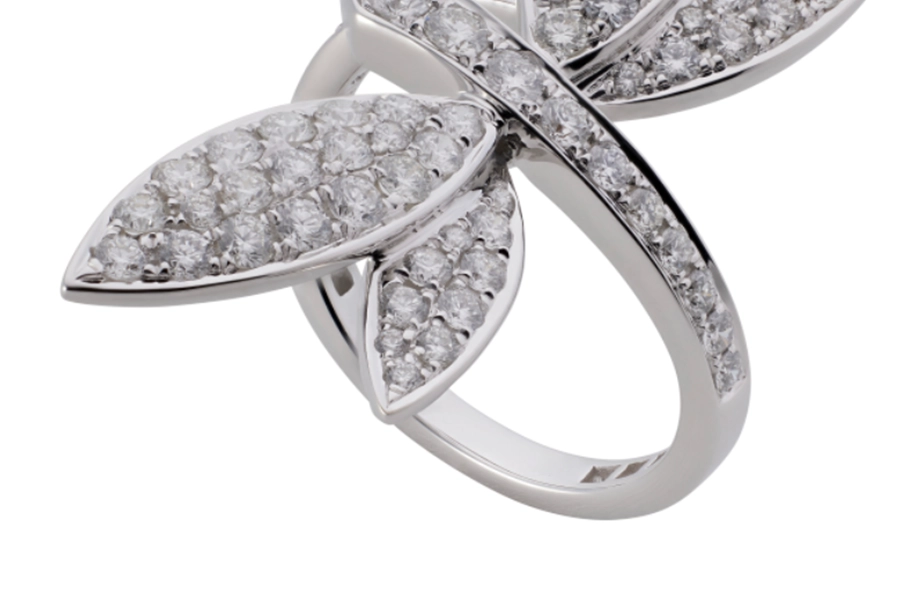
A cluttered or uneven background distracts buyers. Most e-commerce platforms, including Amazon & Walmart,
require a pure white (#FFFFFF) background.
1. Use the Pen Tool (P) for precise background removal for jewelry.
2. Carefully trace the outline of the product.
3. Convert the path to a selection, then apply a mask.
Real-World Note: Tiffany & Co. frequently employs clean, pastel backgrounds to convey a premium aesthetic.
For luxury branding, soft gradients or subtle shadows are sometimes preferred.
Step 3: Crop & Straighten the Image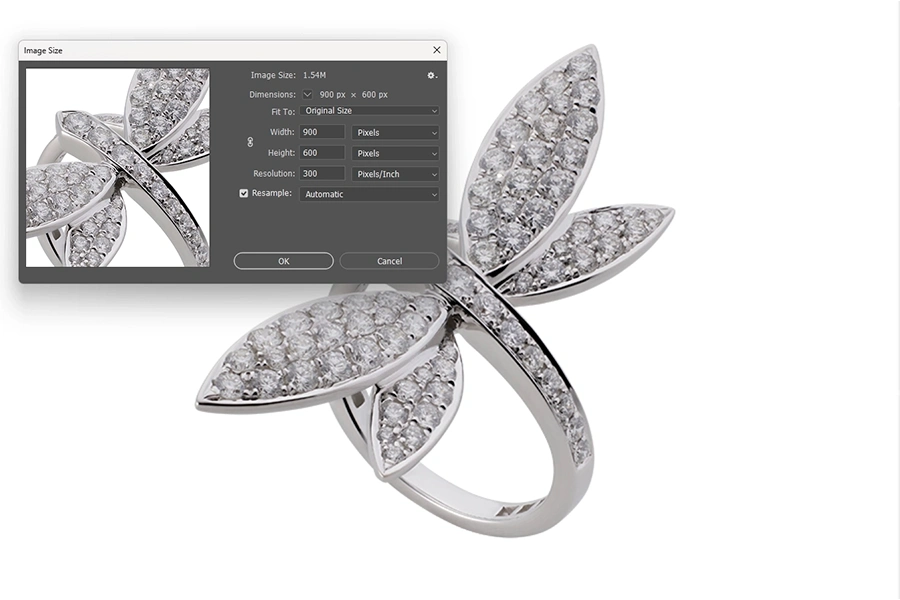
Consistency matters in online catalogs. Cropping ensures jewelry looks balanced & uniform.
1. Use the Crop Tool (C) to frame the piece.
2. Align rings upright & center pendants.
3. Maintain equal margins so all products look consistent.
Tips: A professional jewelry image editing service always applies the same cropping ratio for the entire product categories.
Step 4: Remove Dust, Scratches & Imperfections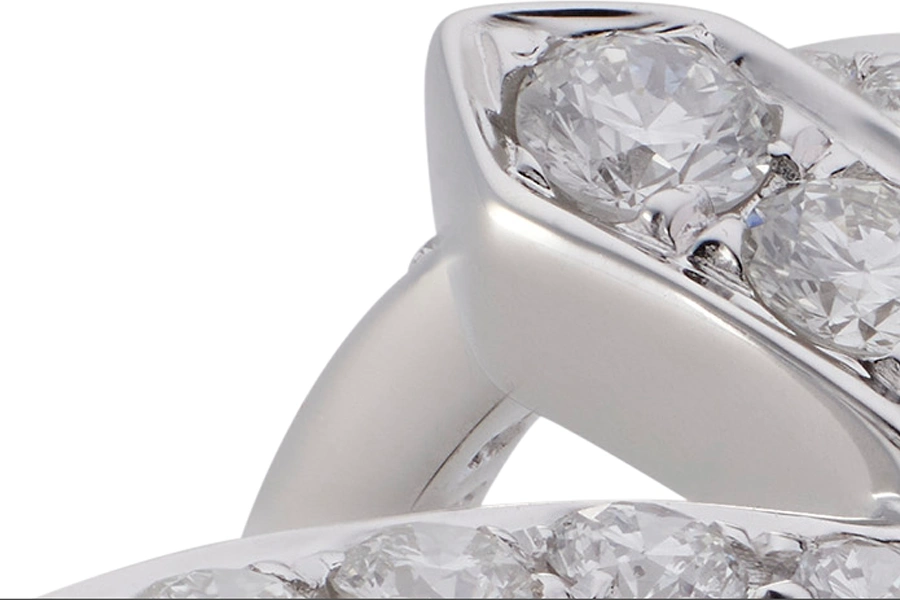
Jewelry attracts fingerprints, lint, & Micro-scratches. Under macro photography, these flaws become visible.
1. Use the Spot Healing Brush (J) for small particles.
2. Use the Clone Stamp Tool (S) for larger imperfections.
3. Zoom in at 200-300% to clean every detail.
Real-World Note: A seller on Etsy received poor reviews as customers noticed “scratches” in product photos.
After proper jewelry retouching, their listings gained trust & higher sales.
Step 5: Adjust Lighting & Exposure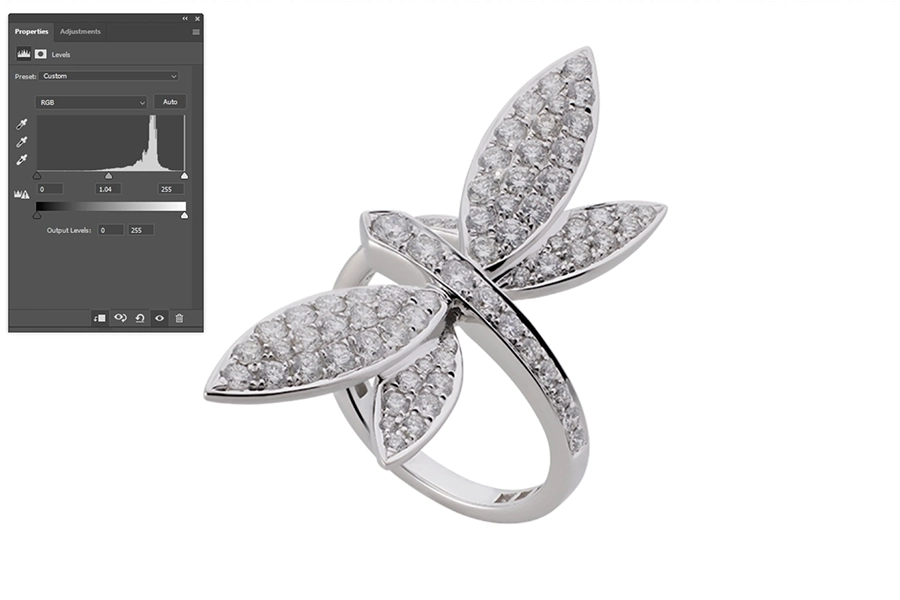
Jewelry sometimes looks darker on camera. Correcting light makes metals shine & gemstones glow.
1. Go to Image > Adjustments > Levels (Ctrl + L).
2. Balance highlights, midtones & shadows.
3. Avoid overexposure, which can make diamonds look washed out.
Step 6: Color Correction for Accuracy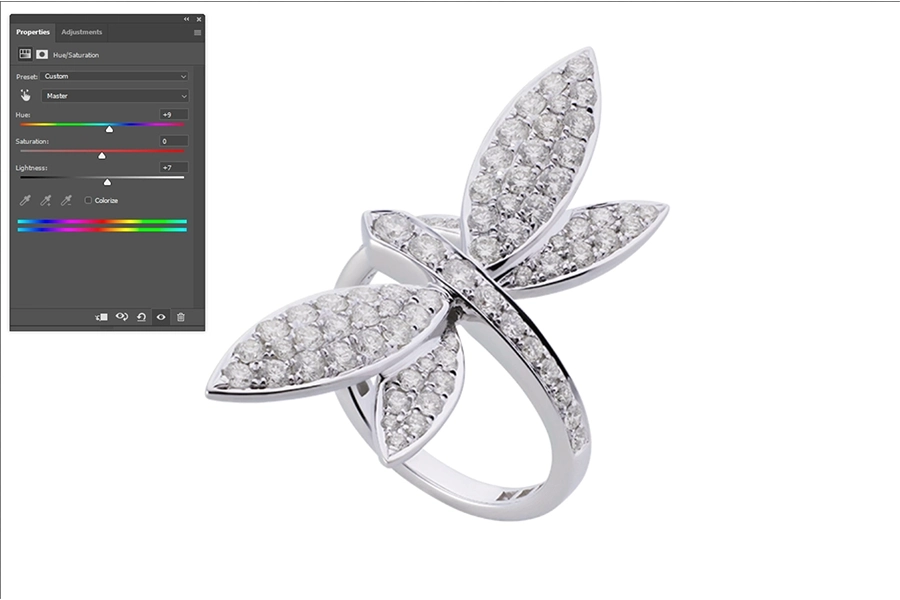
Colors must match real-life jewelry. Misleading tones cause product returns & damage trust.
1. Use Hue/Saturation (Ctrl + U) for gemstone corrections.
2. Apply Selective Color to fine-tune gold, silver, or platinum shades.
3. Keep diamonds white & clean with reduced yellows/blues.
Real-World Note: An Amazon seller faced frequent returns because gold appeared too “yellow” online.
After jewelry color correction, complaints dropped.
Step 7: Enhance Sparkle & Details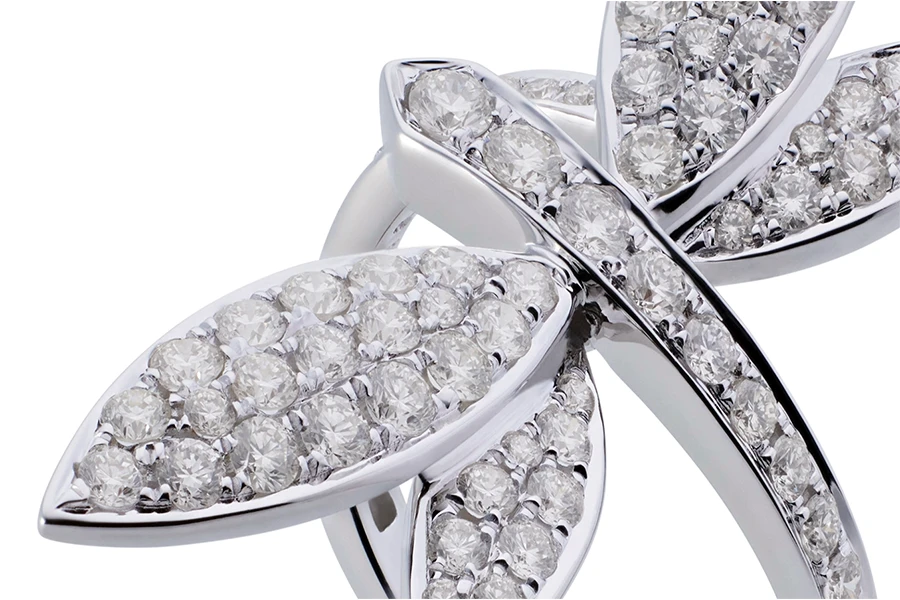
Jewelry buyers expect brilliance. Editing enhances natural shine without making it appear artificial.
1. Duplicate the layer, apply High Pass Filter (Radius: 1-2px), then set Blend Mode to Overlay.
2. Brighten diamond facets with the Dodge Tool (O).
3. Enhance gemstone edges for crisp detail.
This process is central to high-end jewelry photo editing, especially for diamonds.
Step 8: Add Natural or Artificial Shadows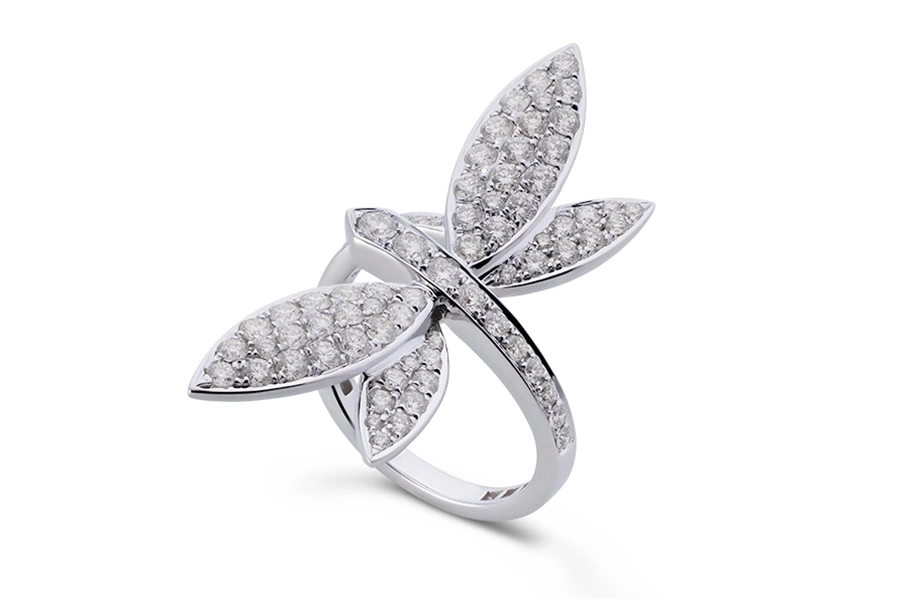
Shadows give depth & realism. Without them, jewelry looks flat.
1. For Natural shadows, adjust using the Burn Tool (O).
2. For artificial shadows, create a soft ellipse under the product, blur it & reduce opacity.
Real-World Note: On eBay, shadowless jewelry often looks “cut out”. Adding shadows makes listings more professional.
Step 9: Save in the Right Format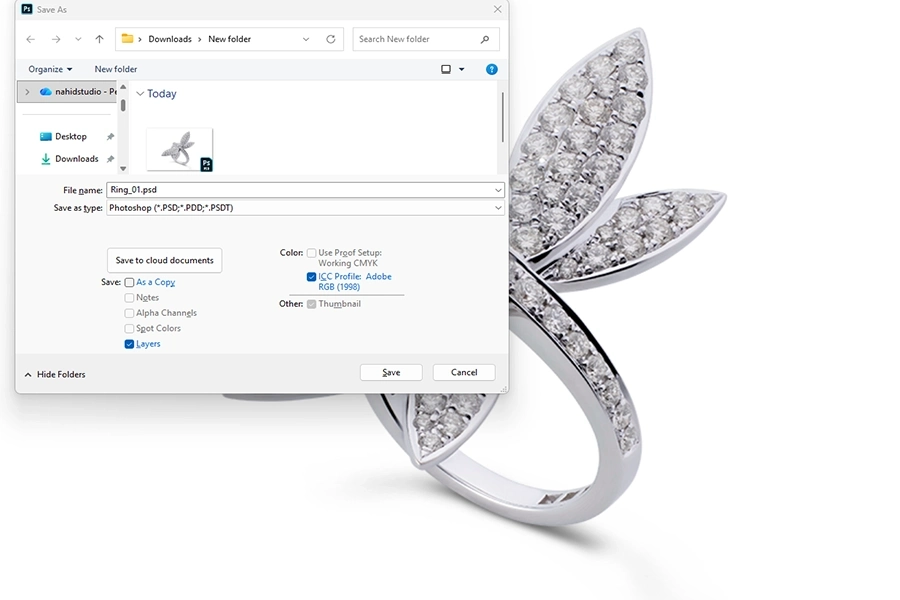
Final output matters for ecommerce performance.
1. Save for Web (Ctrl + Shift + Alt + S) to reduce file size without losing quality.
2. Use JPEG for catalogs, PNG for transparent backgrounds.
3. Always keep a high-resolution PSD file for future edits.
Editing jewelry photos is both an art & a science. From background removal to color correction,
each step ensures the product looks realistic, consistent & attractive.
Jewelry Retouching vs. Flat Lay Editing: Which one is best for you?
In e-commerce, how jewelry is presented can greatly influence a customer’s decision to make a purchase. Two of the most
popular methods are jewelry retouching & flat lay editing. Each of them has unique advantages depending on your brand’s goals.
| Feature | Jewelry Retouching | Flat Lay Editing |
| Purpose | Enhances fine details, clarity & shine of individual pieces. | Focuses on styling, layout & presentation of multiple pieces together. |
| Best For | High-value jewelry like diamond rings, gold necklaces & engagement collections. | Fashion jewelry, sets, bracelets, earrings & Trendy collections. |
| Process | Remove Scratches, polishes metal, balance reflections, and sharpen gemstones. | Clean background, adjust colors, and arrange jewelry with props or textures. |
| Customer Appeal | Builds trust & authenticity by showing precise craftsmanship. | Attracts buyers with lifestyle visuals & modern, Instagram-worthy layouts. |
| Real-life Example | A luxury brand showcasing a diamond engagement ring with perfect sparkle. | An online store displaying a summer jewelry set styled with seashells & fabric. |
| When to Use | For hero shots, product pages & close-up details where clarity is key. | For Catalogs, lookbooks & social media where style & variety matter. |
| Overall Advantage | Highlights quality, builds buyer confidence, supports premium pricing. | Highlights creativity, boosts engagement, supports volume sales. |
| Which One is Best for You | If your brand focuses on luxury & trust, jewelry retouching works best. |
If your brand focuses on style & Storytelling, flat lay editing is ideal. |
Many businesses combine both retouching for the hero product and flat lay for lifestyle appeal. If your brand focuses on luxury & trust,
jewelry retouching works best. If you want to emphasize style & storytelling, flat lay editing is ideal.
Common Mistakes in Jewelry Photo Editing
Jewelry editing requires precision, but even minor mistakes can compromise the quality of the final images.
Understanding these errors helps ecommerce stores avoid poor visuals & lost sales.
Over-editing Gemstones
A common mistake is pushing brightness & saturation too far. While the goal is to make diamonds sparkle, excessive editing can make them look fake. For example, in editing diamond jewelry photos, over-polished gems often lose natural depth, leading customers to distrust the product.
Incorrect Color Tones
Gold, silver & gemstones must show accurate colors. Poor jewelry color correction may turn yellow gold into an orange tone or make emeralds look dull. Customers expect true-to-life representation, especially when buying luxury pieces. Wrong tones cause high return rates.
Ignoring Reflections & Dust
Jewelry surfaces capture fingerprints, dust & harsh reflections. If editors forget to clean these during jewelry retouching, images look unprofessional. For example, an earring photographed under studio light may reflect the photographer’s hand, distracting buyers.
Poor Background Removal
Many brands utilize background removal for jewelry, but cutting too close or leaving rough edges can create unnatural results.
Jewelry should appear smooth & precise when displayed on a white background.
Inconsistent Editing Across Products
Ecommerce stores often upload hundreds of jewelry pieces. If brightness, contrast & background shades are inconsistent,
the entire catalog looks unbalanced. This confuses the buyer & weakens brand trust.
Ignoring Natural Shadows
Shadows add depth & realism. Removing them completely makes jewelry float unnaturally.
Skilled editors add subtle artificial shadows when natural ones are missing.
Quick Checklist of Mistakes to Avoid in Jewelry Photo Editing:
1. Over-saturating diamonds or gemstones.
2. Incorrect color tones for gold, silver & gems.
3. Leaving reflections, dust, or fingerprints visible.
4. Rough or unnatural background removal.
5. Inconsistent brightness, contrast or tones across products.
6. Removing all shadows instead of balancing them.
By avoiding these errors, jewelry images stay authentic, professional & trustworthy. In turn, the sales increase in ecommerce jewelry.
DIY Jewelry Editing vs. Hiring a Professional
| Feature | DIY Jewelry Editing | Professional Jewelry Image Editing Service |
| Who It’s Best For | Small businesses, startups or individual sellers. | Established ecommerce stores & luxury jewelry brands. |
| Tools Used | Photoshop, Lightroom or free online editors. | Advanced software & industry-grade methods. |
| Capabilities | Basic edits: background removal, resizing, & simple color correction. |
Detailed work: jewelry retouching, reflection control, high-end sparkle enhancement. |
| Quality Level | Quality level: Moderate, as this may lack precision for diamonds or gold. | Quality level: Advanced, as this ensures high accuracy, consistency, & realism. |
| Volume Handling | Works for a small catalog (like 10-20 pieces). | Scales easily for thousands of images. |
| Real-Life Scenario | An Etsy seller editing silver rings at home. | A jewelry brand showcasing diamond engagement rings. |
| Time Required | Time-consuming; especially for those with limited editing skills. | Faster turnaround; as the work is done by expert editors swiftly. |
| Overall Result | Cost-saving but limited in detail. | Professional, consistent & trustworthy images. |
DIY editing saves money & works for small catalogs. But hiring professionals ensures polished, high-end jewelry photo editing that builds trust & drives sales in ecommerce.
Outsourcing Jewelry Editing: Is It Helpful For Big Companies, Small Studios, and Startups?
Outsourcing jewelry photo editing has become a practical solution for businesses of all sizes. The benefits differ depending on whether you are a large ecommerce brand, a small studio or a startup.
For big companies, outsourcing is essential for handling large volumes. A jewelry retailer with thousands of product photos can’t rely only on in-house staff. Professional jewelry image editing services ensure bulk editing with consistency in color correction, background removal & high-quality retouching. This saves time & guarantees every image meets the same standard.
Small studios benefit from outsourcing when they want to focus on photography instead of spending hours on post-production. For example, a wedding jewelry photographer may shoot hundreds of gold necklaces but lacks time for gold jewelry image retouching. Outsourcing frees them to serve more clients.
Startups often lack advanced editing skills. Outsourcing helps them present jewelry images that compete with established brands. Even on a small scale, professional editing builds trust with first-time buyers.
In all cases, outsourcing provides efficiency, professional results & scalability. Whether handling 20 or 20,000, outsourcing companies allow businesses to stay focused on growth while experts polish the visuals.
FAQs.
1. How to Remove Reflections from Jewelry Images?
Reflections occur due to shiny surfaces. Use clone stamp, healing brush or masking in Photoshop.
Professional jewelry retouching keeps natural shine while removing fingerprints & glares.
Example: reducing hand reflections on a silver bracelet without losing texture.
2. What Background Works Best for Jewelry?
White or light gray backgrounds are best for ecommerce. They keep focus on the product & work well with background removal for jewelry. Lifestyle images can use textures, but product listings need clean, distraction-free backgrounds.
3. How to Make Diamonds Sparkle in Photoshop?
Use dodge & burn tools to brighten highlights & clarity filters to sharpen details.
Avoid over-editing as the diamond should sparkle naturally.
4. When should you use Natural Shadows versus Artificial Shadows?
Natural shadows work when captured during photography, adding realism. Artificial shadows are useful for background removal
to keep products looking grounded. Both add depth.
5. What is the Difference Between Jewelry Retouching and Basic Editing?
Basic editing adjusts brightness, crop & contrast. Jewelry retouching includes removing reflections, enhancing gemstones
& precise color correction for luxury jewelry appeal.
6. Can I use Lightroom Instead of Photoshop for Jewelry Image Editing?
Yes. Lightroom is excellent for batch adjustments & color corrections. Photoshop is better for advanced jewelry retouching.
Many professionals combine both.
7. How Long Does it Take to Edit a Jewelry Photo?
Simple edits take about 5 to 10 minutes. Complex edits like diamonds can take 20 to 30 minutes per image.
8. Why is color correction important?
Accurate jewelry color correction gives true gold tones & vibrant gemstones.
Without it, customers may feel misled, causing returns & trust issues.
Conclusion
High-quality images are the foundation of success for any online jewelry store. This is where jewelry photo editing plays a vital role. From background removal to retouching, every step assures products look realistic yet attractive. Accurate color correction highlights true tones
of gold, silver & gemstones, while methods like jewelry retouching bring out fine details & sparkles in diamonds.
Whether it’s editing diamond jewelry photos or gold jewelry image retouching for a luxury appeal, professional editing creates visuals that drive sales. While DIY techniques may suit small catalogs, outsourcing or hiring experts ensures consistency & efficiency for larger businesses.
In short, learning how to edit jewelry photos for ecommerce is not just about visuals. It’s about building brand trust, reducing returns & boosting customer satisfaction.

Hadi Zaman is a marketing specialist and content writer who loves tech, story writing, and content creation. With years of experience, he creates easy-to-read content that connects with readers. Inspired by new ideas and personal experiences, Hadi makes complex topics clear and relatable.